
The holidays are full of small moments worth sharing: decorating, parties, gifts and quiet nights in. A photo collage post lets you share several of them at once without flooding your followers’ feeds. In this collection, we’ve picked five Christmas photo collage Instagram post templates from the TMint Canva library, from modern and playful to elegant and vintage. Each one opens in Canva, so you can drop in your photos, change the text and post in minutes.
Quick links
- Teal Green and Grey UI/UX Collage Christmas Post
- Red Green and White Elegant Christmas Photo Collage
- Black White and Pink Elegant Christmas Party Collage
- Red and Cream Retro Photo Collage Christmas Party Post
- Red and Cream Vintage Christmas Letter Post
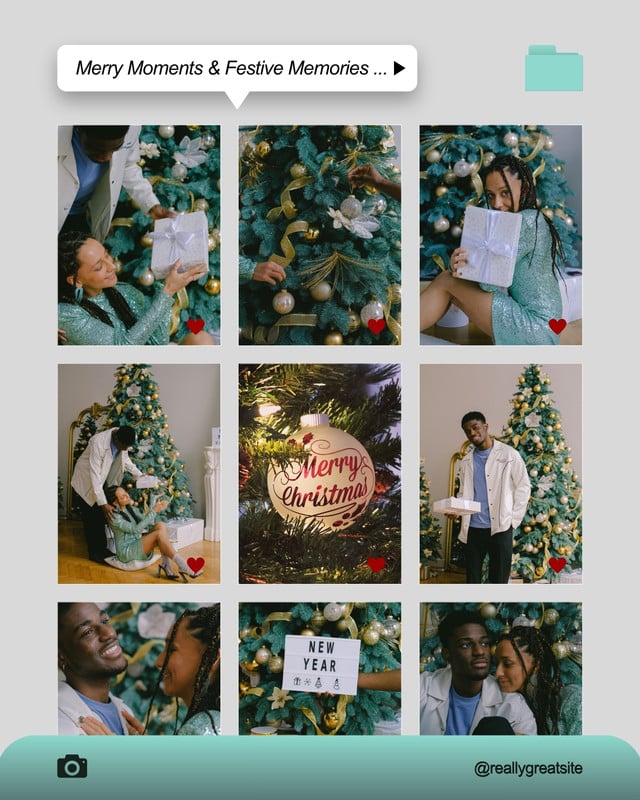
1. Teal Green and Grey UI/UX Collage Christmas Post

- Why we like it: It frames your holiday photos like a phone gallery, complete with a caption bar and folder icon, so a simple photo dump instantly looks designed. The soft teal and grey keep the focus on your pictures.
- Best for: Creators, cafés and studios sharing a “December in photos” recap.
- Plan: Free on Canva
Customize Teal Green and Grey UI/UX Collage Christmas Post in Canva
2. Red Green and White Elegant Christmas Photo Collage

- Why we like it: Classic red and green with plenty of white space gives this collage a polished, magazine-like feel that suits brands with a more premium look.
- Best for: Boutiques, hotels and restaurants posting festive highlights or a holiday campaign.
- Plan: Canva Pro
Customize Red Green and White Elegant Christmas Photo Collage in Canva
3. Black White and Pink Elegant Christmas Party Collage

- Why we like it: Black, white and pink is a fresh break from traditional Christmas colors. It feels modern and a little glamorous, perfect for party photos.
- Best for: Event recaps, office parties, beauty and fashion accounts.
- Plan: Free on Canva
Customize Black White and Pink Elegant Christmas Party Collage in Canva
4. Red and Cream Retro Photo Collage Christmas Party Post

- Why we like it: Warm red and cream with a retro mood make your photos feel nostalgic and cozy, like a vintage holiday card brought to Instagram.
- Best for: Family accounts, bakeries, vintage shops and small businesses with a warm brand.
- Plan: Canva Pro
Customize Red and Cream Retro Photo Collage Christmas Party Post in Canva
5. Red and Cream Vintage Christmas Letter Post

- Why we like it: Instead of a grid, this one pairs your photo with a letter-style message, so you can write a heartfelt thank-you or year-end note to your community.
- Best for: Founders and creators sharing a personal holiday message with followers.
- Plan: Free on Canva
Customize Red and Cream Vintage Christmas Letter Post in Canva
How to choose the right Christmas collage
- Match your brand mood. Modern brands suit the teal or black-and-pink designs, while warm, traditional brands fit the red-and-cream retro and vintage styles.
- Count your photos. Grid layouts work best with six to nine images. If you have one strong photo and a message, the letter-style post is a better fit.
- Keep your tones consistent. Photos with similar lighting (warm fairy lights, or cool daylight) make any collage look calmer and more professional.
- Plan a series. Use the same template for each week of December so your feed looks cohesive.
How to customize these templates in Canva
- Open a template with its link and choose Customize (free) or Use this template (Pro).
- Upload your photos and drag them into the frames. Double-click a photo to reposition it.
- Edit the headline and captions. Keep them short so the photos stay the hero.
- Swap colors with your Brand Kit if you want the post to match your feed.
- Download as PNG or schedule straight to Instagram from Canva.
FAQ
Are these templates free?
Three of the five are free on Canva. The Red Green and White Elegant collage and the Red and Cream Retro collage are Canva Pro templates, available with a Pro, Teams or Education plan or a free trial.
Can I use them for my business account?
Yes. Replace the sample photos with your own and add your logo. They work well for holiday promotions, event recaps and thank-you posts.
Can I turn them into Stories or Reels covers?
Yes. Use Canva’s Resize tool to create a 9:16 Story version, then adjust the layout so nothing important sits near the edges.
Share your holiday moments
Pick the style that feels most like you, add your favorite photos and give your followers a festive post they’ll want to save. For more seasonal designs, visit our Canva Creator profile or browse social media kits in the TMint store.


